Scripted Transform
description: C# Scripted Transform
C# Scripted Transform
The C# Scripted Transform feature in SyncNow allows operators to run custom C# scripts on source system fields during synchronization. This provides powerful flexibility for complex data transformations that cannot be achieved through standard field mappings.
📝 Overview
With scripted transforms, you can tailor transformation logic to your specific needs by editing the provided function template.
A Validate button is available to ensure your script is correct before applying it.
🧩 Function Template
The function template for a C# scripted transform is shown below. The return type matches the type of the target mapped system field.
/// <summary>
/// Calculates the Summary (summary) field's value
/// of the Story entity of the JiraCloud
/// </summary>
/// <param name="mapping">The MappingContext object with properties:
/// dynamic SourceEntity - fields of the Sales Process entity
/// string SourceEntityID - source entity ID
/// string SourceEntityName - source entity name
/// string SourceFieldName - source field name
/// string SourceFieldValue - source field value
///        (if the source field is of Picklist, User, Wiki, HTML, Reference, List Reference data type or Tags or Labels
///        then the SourceFieldValue may contain already transformed data by default transformations)
/// dynamic CurrentTargetEntity - current fields of a target entity
/// string SystemName - source system name
/// </param>
/// <returns>Value of the field</returns>
string CSharpFunc (MappingContext mapping)
{
    // Source entity fields
    var sourceDic = (IDictionary<string, object>) mapping.SourceEntity;

    // Current target entity fields
    var targetDic = (IDictionary<string, object>) mapping.CurrentTargetEntity;

    /*
     * Add code here.
     * For example:
     *     if (!sourceDic.ContainsKey("work_notes")) return string.Empty;
     *     var fieldValue = "My Value";
     *     return fieldValue;
     * Return '@@DO_NOT_SYNC' if you want to skip synchronization for this field:
     *     return "@@DO_NOT_SYNC";
     */

    return null;
}
return CSharpFunc(Mapping);
🚦 Step-by-Step Guide
1️⃣ Navigate to the Processes Page
- Go to the Processes page.
2️⃣ Open Mapping Entities
-
Press the Mapping Entities button.
- If the process inherits a global mapping, press the Edit Global Mapping button.
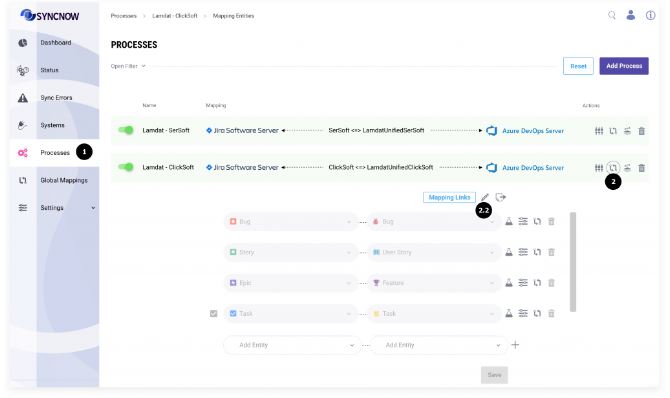
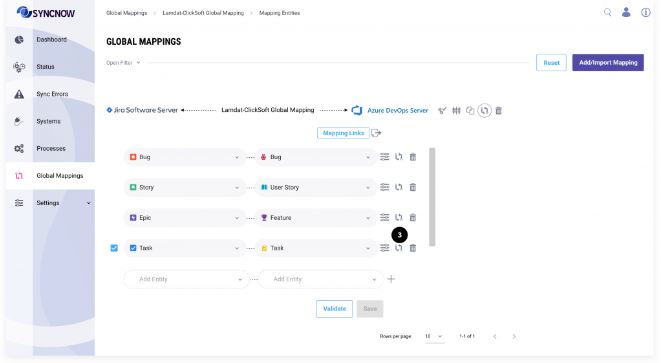
3️⃣ Open Field Mapping
-
Press the Mapping Fields button near the entity pair you want to transform.
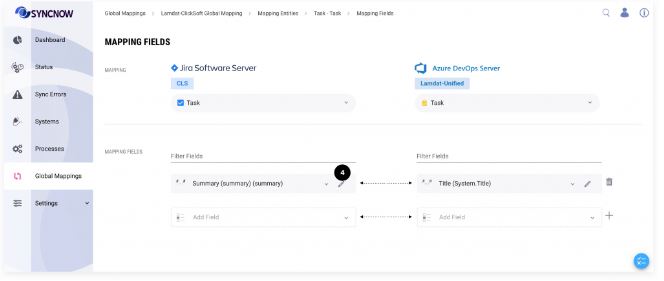
4️⃣ Edit Field Mapping
-
Press the Edit button next to the field you want to transform.
5️⃣ Add Script
-
Enter your custom C# script in the provided code editor.

6️⃣ Validate Script
- Press the Validate button to ensure the script is valid.
7️⃣ Save Changes
-
Press the Save button to apply the script.

🧑💻 Scripted Transform and the 'any' Field Type
If the target system field type is 'any', the C# script should return an object (C# dynamic), which is useful for complex field types such as user objects.
💡 Example Script
Below is an example script that checks if the source field work_notes exists and returns its value. If the field does not exist, it returns an empty string. If the synchronization should not proceed for a specific condition, it returns @@DO_NOT_SYNC.
string CSharpFunc (MappingContext mapping)
{
    // Source entity fields
    var sourceDic = (IDictionary<string, object>) mapping.SourceEntity;

    // Current target entity fields
    var targetDic = (IDictionary<string, object>) mapping.CurrentTargetEntity;

    // Check if the source entity contains the 'work_notes' field
    if (!sourceDic.ContainsKey("work_notes"))
    {
        // If 'work_notes' field does not exist, return an empty string
        return string.Empty;
    }

    // Retrieve the value of 'work_notes' field
    var fieldValue = (string)sourceDic["work_notes"];

    // Custom logic can be added here

    // Example: Prevent synchronization under certain conditions
    if (fieldValue == "Do not sync")
    {
        return "@@DO_NOT_SYNC";
    }

    // Return the transformed value
    return fieldValue;
}
return CSharpFunc(Mapping);
In this example, the script transforms the work_notes field from the source system. If the field contains the value "Do not sync", the script returns @@DO_NOT_SYNC to prevent synchronization. Otherwise, it returns the field value.
Tip:
Use C# scripted transforms for advanced mapping scenarios, such as conditional logic, data formatting, or integrating with custom business rules.